Panel reference
Filament panel
Load, unload, swap filament
Where Home → Filament tileControls 7
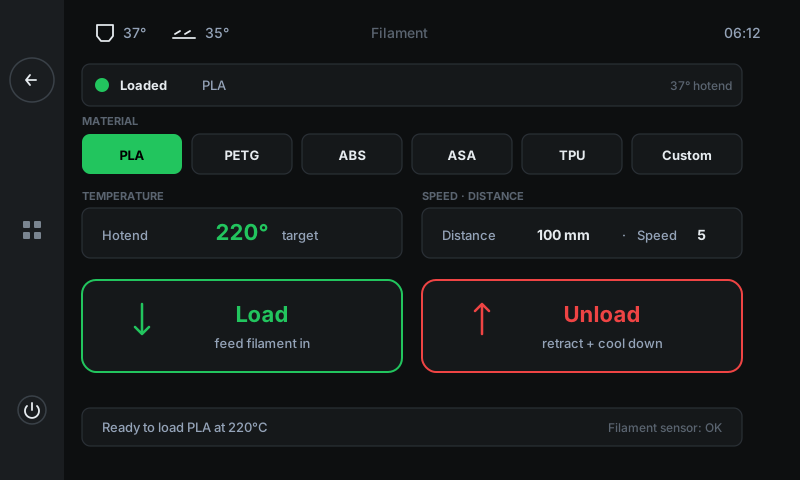
Everything for filament changes lives here. Pick the material from the picker — that sets the right hotend temperature automatically — then tap Load or Unload. The printer handles the rest with a live operation view showing heating / loading / complete states.
 1234567
Current state strip
What's loaded right now.
Green dot + 'Loaded' + material name when filament is present; grey dot + 'Empty' otherwise. The right side shows the live hotend temperature.Material picker
Sets the right hotend temp automatically.
Six pills: PLA (190 °C), PETG (240 °C), ABS (250 °C), ASA (250 °C), TPU (220 °C), Custom (configurable). Pick first — the temperature card below updates instantly so heating starts at the right value.Temperature card
Live hotend temp + target.
Current hotend reading plus the target set by the material picker. Goes green when at target. Wait for green before pulling filament — the strand needs to be molten.Distance · Speed
How much filament to push, how fast.
Distance (100 mm by default — covers the bowden tube + clean purge) and speed (mm/s of filament travel). Bump distance to 150 mm for big colour swaps so the old colour fully purges.Load button
Feed filament IN.
Use this after you've inserted a new spool into the extruder. The printer heats first if needed, then feeds Distance mm of filament through to the nozzle.Unload button
Retract filament OUT.
Heats the nozzle, melts the existing strand free, then retracts Distance mm so you can pull it the rest of the way by hand without stripping the gears.Status bar
Operational hints + sensor state.
Plain-language status (e.g. 'Ready to load PLA at 220°C') and on the right, the runout-sensor state if your machine has one.
Good to know
- Don't pull the strand while the operation view says HEATING. Wait for UNLOADING — pulling cold filament can strip the extruder gears.
- Custom material lets you set any hotend temperature you want — useful for niche filaments or matching the spool manufacturer's recommendation.