Panel reference
Fine Tune panel
Live tweaks during a print
Where Job Status → Fine Tune buttonControls 6
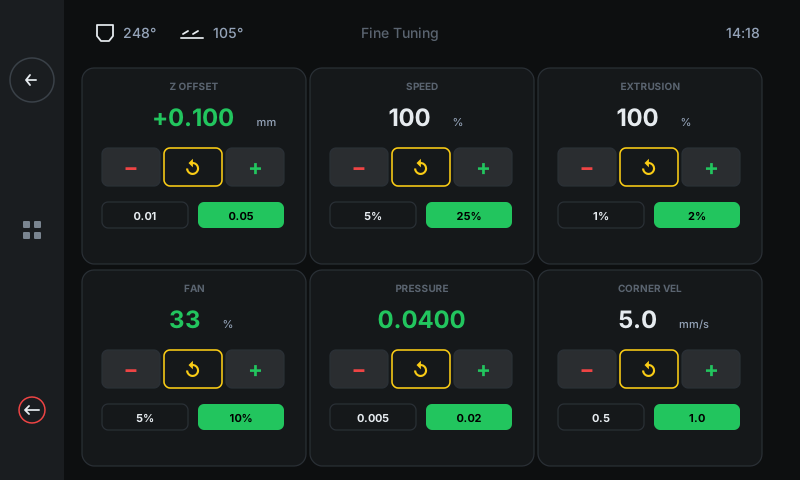
Six independent live-tunable cards. Every change is applied to the running print immediately — no pause, no stop. Each card is built the same way: title, current value, − / ↺ / + buttons, and two step-size pills for fine vs coarse adjustments.
 123456
Z OFFSET
Live first-layer height.
The most common tune. Adjusts the toolhead's Z position in millimetres while printing. Negative = closer to bed. Step ±0.01 mm (fine) or ±0.05 mm (coarse). The change shows up on the very next layer. See the walkthrough for the visual diagnostic chart.SPEED
Overall print speed factor.
Multiplier on the slicer's commanded speed. 100% = no change. Drop to 50% to slow down a tricky bridge or overhang; bump to 130% on chunky infill once you've confirmed quality.EXTRUSION
Flow factor (extrusion rate).
Multiplier on filament feed. Walls look gappy or under-extruded? Bump to 102-105%. Over-extruding (blobs, lumpy top surfaces)? Drop to 97-98%. Small adjustments go a long way — never jump more than 5% at once.FAN
Part-cooling fan speed.
Live override of the part-cooling fan. Increase for bridges and overhangs (more cooling = sharper detail), decrease for ABS / ASA so the part doesn't warp from too much airflow.PRESSURE (Advance)
Extruder pressure compensation.
Pressure Advance — compensates for the extruder's slight delay when stopping or starting filament flow. Higher = sharper corners, less stringing, less ooze. Typical range 0.02 – 0.06 for direct drive, 0.3 – 0.8 for bowden.CORNER VEL
Square corner velocity.
How fast the toolhead is allowed through sharp corners. Lower = smoother corners but slower print. Higher = faster, but may cause ringing on tall walls. Default 5 mm/s is conservative — bumping to 8-10 mm/s can shave significant time off detail-heavy prints.
Good to know
- Every Fine Tune change is per-print — values reset to defaults when the printer reboots.
- To make a Z offset stick permanently, finish the print and tap Settings → Save Z (Probe) on Job Status.