Panel reference
Input Shaper panel
Vibration / ringing tuning
Where More → Input ShaperControls 5
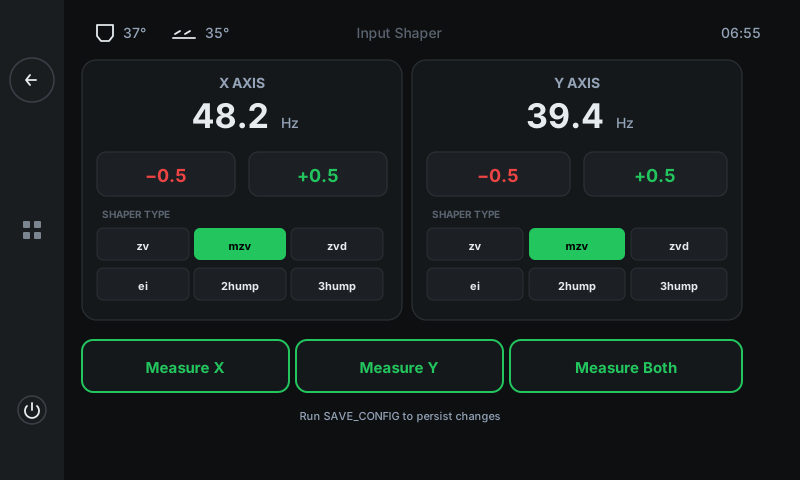
Set the X and Y resonance frequencies and shaper type to cancel ringing artefacts (those echoes you see after sharp corners on tall walls). Auto-calibrate via Measure X / Y / Both if you have an ADXL accelerometer mounted, or set values manually if you already know them.
 12345
12345X axis card
Resonance frequency + shaper for X.
Live X-axis resonance frequency in Hz, with ±0.5 Hz adjust buttons. The shaper grid below picks how Klipper smooths motion to cancel ringing at that frequency.Y axis card
Resonance frequency + shaper for Y.
Same shape as the X card but for the Y axis. Y is usually a lower frequency than X because the Y mass is heavier (whole bed moves, in some designs).± frequency adjust
Step the frequency up or down by 0.5 Hz.
Manual tuning. The right frequency is found by Measure (below) or by running the SHAPER_CALIBRATE flow externally and writing the result here.Shaper type grid
Six shaper algorithms.
zv (default, fastest), mzv (modified zv — most common pick on the QALAM), zvd (more aggressive), ei (extra insensitive), 2hump_ei (two-frequency), 3hump_ei (three-frequency). The selected shaper is shown in green.Measure X / Y / Both
Auto-calibration via ADXL accelerometer.
Runs Klipper's SHAPER_CALIBRATE flow on the chosen axis. The toolhead vibrates at progressively higher frequencies while the accelerometer records the response. After ~2 minutes per axis, the panel writes the optimal frequency + shaper to the corresponding card.
Good to know
- Manual ± changes apply for the current session only — run SAVE_CONFIG (or finish a print and tap Settings → Save) to keep them across reboots.
- Measure X / Y requires an ADXL345 accelerometer wired to the toolhead — present on all 3DISM QALAM machines with EBB36 toolhead boards.
- Re-calibrate after any mechanical change: new belt tension, new toolhead mass, swapped bed.